Shift scheduling
Build next week before the coffee goes cold
Copy last week, drop people into gaps, publish once. Nothing goes live until you say so.
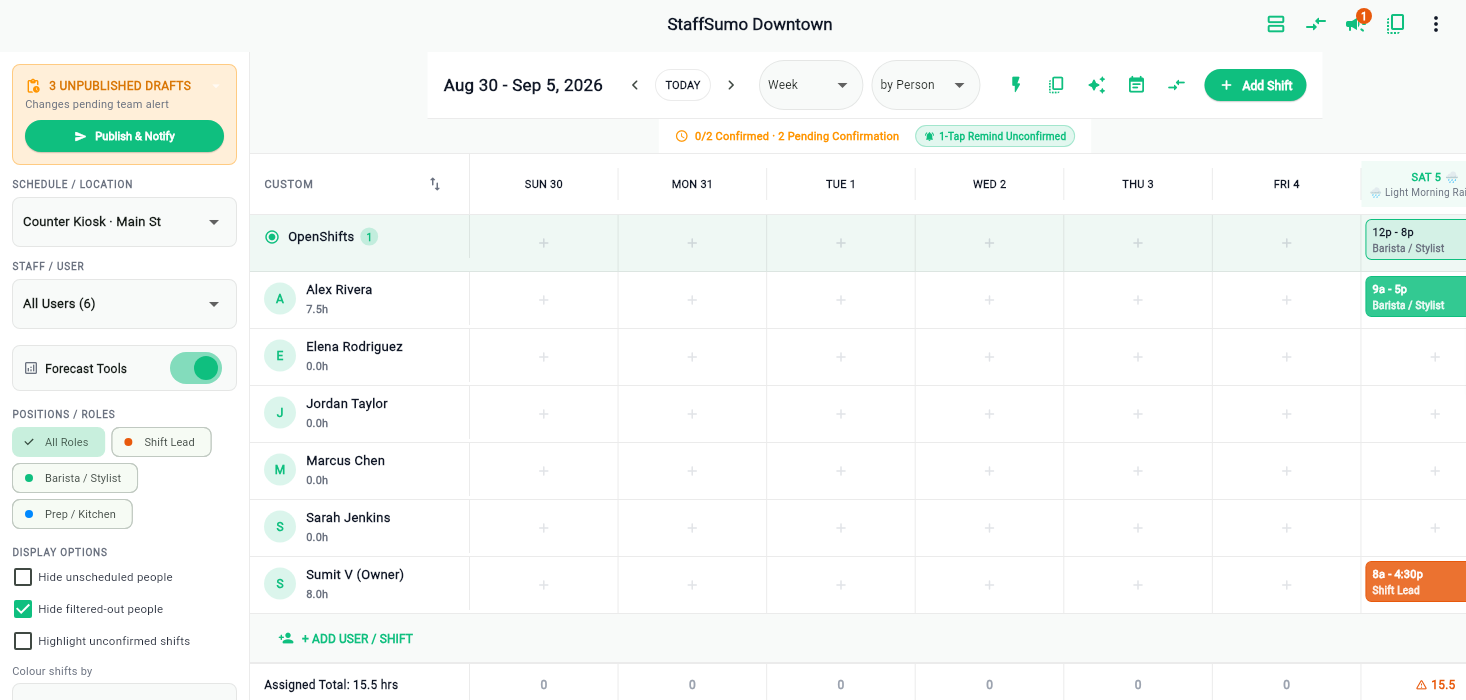
Drafts stay drafts
Nothing you place is visible to staff until you publish. Build the week across three sittings if that is how the week goes, then release it in one action and let everyone find out at the same moment.
- Publish & notify sends the whole week at once
- Unpublished changes are counted so you never release half a week
- Employees see only published shifts, never a draft you were still thinking about
Copy last week, then fix the differences
Most weeks are last week with three changes. Copy the week across and choose what should happen where it collides: skip anyone already booked, replace what is there, or bring it over unassigned for you to place.
- Four collision strategies, so a copy is never a surprise
- Auto-assign fills open shifts with whoever is free and least loaded
- Overlaps are refused rather than quietly double-booked
Open shifts, swaps and time off
Post a shift nobody is on and let the team claim it. Swaps go to a manager for approval rather than happening in a group chat, and time-off requests sit against the same calendar you are building from.
- Claim, drop and swap with an approval step
- Availability visible while you build, not after
- Every change is written to a history you can read back
Start with one shift this week
Put one opening checklist on one location and see what comes back. Your first month is free, no card up front, and your data leaves with you if it is not for you.